
How to Read a Fish Finder: A Beginner's Guide
Reggie Thompson · June 25, 2026 · 7 min read
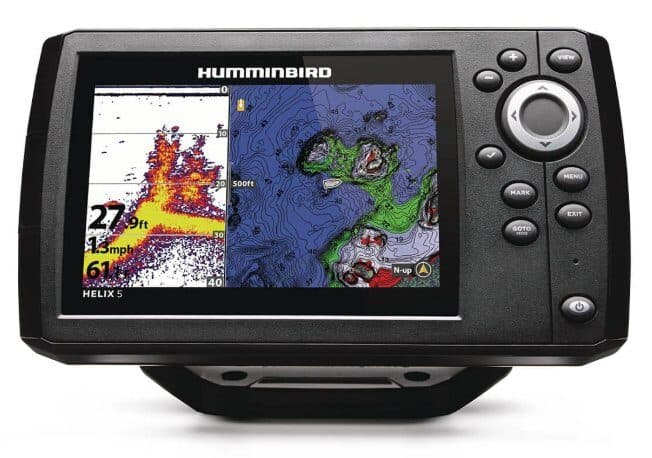
The first time I actually sat behind a fish finder and tried to use one was on a walleye lake in Ontario. My uncle had a decent Humminbird on his boat, and when I asked him what I was looking at, he pointed at the screen, said "that's the bottom," and went back to rigging.
Which is how most of us learn. You watch. You guess. You gradually figure out that the thick line at the bottom of the screen is the lake floor and that the curved shapes above it might be fish. But "might be" is doing a lot of work there, and for a long time that's about as far as I got.
This post is what I wish someone had explained to me. Not the manufacturer's manual version — the version that makes it actually click.
What You're Looking at on the Screen
A fish finder screen is a scrolling picture, moving right to left. The right edge of the screen is what's happening now, directly under the boat. The left side is what happened a few seconds ago. As you move, the picture scrolls.
The depth is on the right side of the screen as a number. That's the distance from your transducer to the bottom. Easy.
Everything else takes a minute.
Understanding the Sonar Cone
Your transducer sends out a cone-shaped pulse of sound into the water. Picture an ice cream cone pointing straight down from the bottom of your boat. Everything inside that cone that reflects sound comes back as a signal.
At 20 feet deep, a standard 20-degree cone covers roughly a 7-foot diameter circle on the bottom. At 40 feet, that circle is about 14 feet across. The deeper you are, the wider the area you're reading.
This matters for one reason: fish that appear on your screen may not be directly under the boat. They could be 5 feet to the side, still inside the cone. This is why you'll sometimes mark fish that you can't get a bite from no matter what you do — they're close, but not where you think they are.
Fish Arches
The classic fish finder image is a round arch, and the reason fish look like arches is the geometry of the cone.
When a fish enters the cone, it's at the outer edge — the sonar hits it at a slight angle, making it look deep. As the fish (or the boat) moves and the fish passes through the center of the cone, the return is strongest and it appears shallower. Then as it exits the cone, it appears deep again. That entry-center-exit path creates the arch shape.
A full arch means the fish passed completely through your cone. A half arch means it entered but didn't exit — you passed over it, or it moved out before you cleared it.
What arch thickness tells you: A thicker arch usually indicates a bigger fish. Not always. But that's the general rule.
What happens when fish are schooled: You often don't see individual arches at all. You see a blob of returns — a cloudlike mass on the screen. That's a bait ball or a school of fish packed tight enough that individual returns overlap. Bass stacked over a point in fall can show this way.
One thing that threw me for a while: fish don't always show as arches. If the fish is stationary and you're moving slowly, you might get a long flat line instead of a curved arch. If you're at anchor and a fish swims through, you get an arch. The arch is about relative motion between the cone and the fish.
Reading the Bottom
The bottom shows up as a thick line on your screen. Thickness tells you something.
A thin, defined line typically means hard bottom — rock, packed sand, gravel. The sonar bounces cleanly off a hard surface.
A thick, fuzzy line means soft bottom — mud, silt, heavy weeds. The sonar penetrates soft material before reflecting, creating a softer, wider return.
Bass anglers care about this because bass hold differently on hard vs. soft bottom. Rock points hold differently than mucky flats. Learning to read the bottom type quickly is one of the more practically useful things a fish finder can do for you beyond just showing fish.
Bottom contour changes: Watch for sudden depth changes on your screen. A shelf dropping from 8 feet to 18 feet over a short distance is a classic bass and walleye holding spot. Fish hang at depth transitions. Your fish finder will show you that transition as a quick drop on the bottom line.
What CHIRP Means for Reading Returns
Standard sonar sends a single frequency pulse. CHIRP sends a sweep of frequencies — from low to high — in each pulse. The result is better separation between objects close together.
In practical terms: CHIRP shows you fish that are tight to the bottom more clearly. With standard sonar, a fish sitting 2 feet off a 20-foot bottom sometimes blends into the bottom return and disappears. CHIRP separates them. It also draws tighter arches with less noise.
If you have a CHIRP unit, what you're seeing is more accurate than what non-CHIRP units show. Arches are crisper. Bottom definition is cleaner. You can trust what you see more.
Understanding Down Imaging
Down Imaging (Humminbird's term; Garmin calls it ClearVü) looks straight down like standard sonar but produces a much higher-resolution picture. Instead of cone-shaped sonar, it uses a very thin, fan-shaped beam pointed straight down.
The result looks almost like an underwater photograph. You'll see the shape of a laydown clearly, not just a return that tells you something is there. You can see individual branches on a fallen tree. You can see a ball of baitfish and distinguish it from the texture of a weed flat.
What Down Imaging doesn't do: it doesn't tell you fish depth as cleanly as standard sonar arches do. You see shape, but standard sonar is still better for identifying fish locations and depths quickly. Most anglers with DI units use both views simultaneously — one screen showing standard sonar, one showing DI.
GPS and Waypoints
If your unit has GPS, use the waypoint function from day one. Every time you mark a fish, get a bite, or notice a promising depth change, drop a pin.
Over the course of a season, those waypoints build into a map of productive areas on your home water that no published map will give you. That's the real value. The GPS isn't about knowing where you are. It's about recording where the fish were.
Common Mistakes When Starting Out
Sensitivity too high. If your screen looks like TV static with returns everywhere, sensitivity is cranked up too far. Dial it back. Most modern units auto-adjust sensitivity well — let them.
Moving too fast. Fish arches require the fish to pass through your cone cleanly. At high speed, returns are compressed and arches collapse. Slow down when you're actually trying to read the screen.
Ignoring the bottom. Beginners fixate on fish arches and ignore what the bottom is doing. The bottom tells you where fish are likely to be before you even see them.
Expecting to see all the fish. A fish finder doesn't show you every fish in the water. It shows you fish that are inside your cone, at that moment, in a position to return signal clearly. Plenty of fish won't show up at all. It's a tool, not a guarantee.
My Honest Take
I spent a lot of years not having a fish finder and catching fish anyway. The fish finder didn't make me a better angler overnight. What it did was help me understand water I didn't know — a new lake, a different section of familiar water — faster than I could have without it.
If you're new to electronics, give yourself a few outings before expecting to use the information fluently. It's a skill like reading water, not a feature you turn on.